Murmur
Listen to every platform at once: trends, brands, topics and the creators who move them
Overview
The platform analyses social media posts across multiple platforms to uncover emerging trends, brand performance, topic engagement, and influencer activity. Designed for Social Media Marketing Managers and Market Research Analysts, it enables users to benchmark their brand against competitors, compare the performance of different topics, and identify influential voices within relevant conversations.
By connecting brands with the right influencers for specific products and campaigns, the platform supports targeted marketing strategies, informed budget allocation, and greater brand awareness. These insights also help businesses identify evolving consumer interests, discover opportunities for product innovation, and make data-driven decisions that contribute to sales growth.
Role
Product Designer | Murmur
Information Architecture, UX Design, Visual Design, Design System, Prototyping
October 2026
Product
Murmur
Note: The dashboard uses dummy data.
Problem Statement
Conversations about a brand, a product category or a competitor happen everywhere at once — on X, Instagram, TikTok, YouTube, Reddit and LinkedIn. Each platform has its own format, its own audience and its own way of measuring engagement, so the full picture is never in one place.
Marketing managers and research analysts end up stitching exports, spreadsheets and screenshots together by hand. By the time a report is ready, the trend has moved on. It is hard to tell which topics are growing, how the brand compares with competitors, which creators are genuinely relevant rather than simply large, and which complaints or buying signals need a reply today. The result is slower decisions, campaign budgets spent on guesswork, and missed chances to act while a conversation is still live.
Business Case
1. Drive and influence sales, and create new product lines
2. Generate brand awareness
3. Plan and decide the social media marketing budget
User Goals
01
Identify topics and themes related to a particular keyword and know the trends on social media platforms
02
Identify top influencers and top posts on social media for promotional activities
03
Identify and compare the most suitable influencers for the brand
Who It's For
Murmur is designed around two primary users who read the same conversation for different reasons:
Persona 01
Social Media Marketing Manager
"I need to know what to post, where, when — and who should post it with us."
Goals
- Grow brand awareness and share of voice
- Pick creators who fit a product or campaign
- Spend the campaign budget where it lands
- Answer complaints and questions before they escalate
Persona 02
Market Research Analyst
"I need to see what people really think, how it is changing, and how we compare."
Goals
- Spot emerging trends and rising topics early
- Track sentiment by topic and by platform
- Benchmark the brand against competitors
- Surface unmet needs that point to product innovation
User Scenarios & Flows
Each flow begins on the home page with a choice between keyword-based and influencer-based trends, then narrows the conversation with keyword, source and timeframe before the insight the user came for.
User Scenario 01
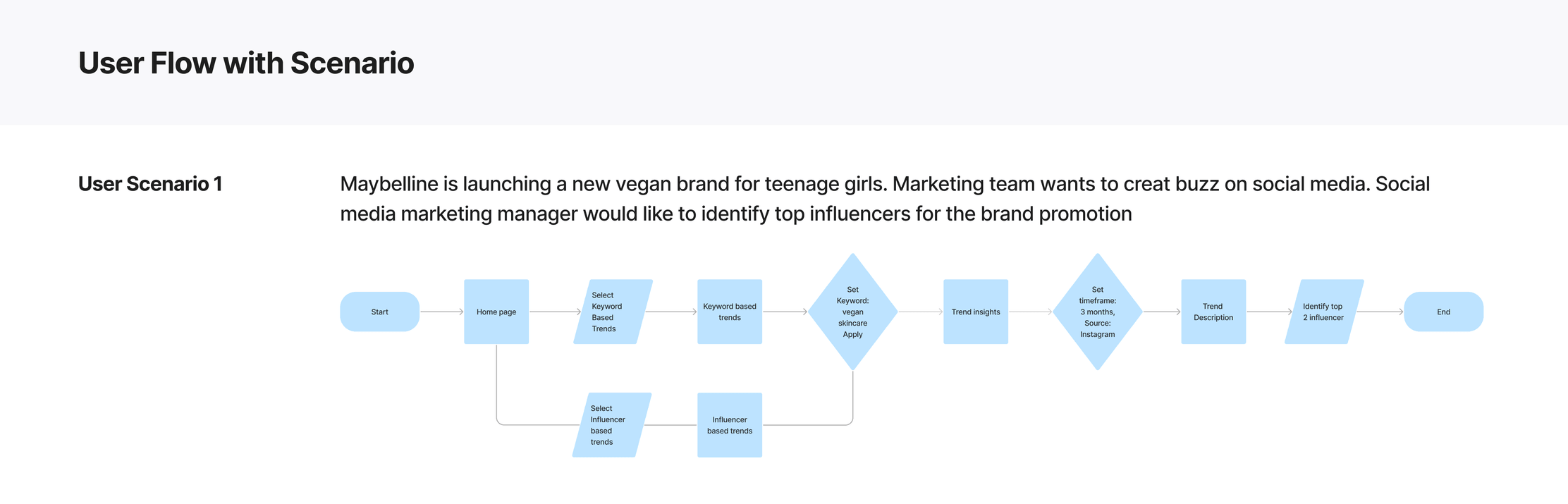
Find top influencers for a vegan brand launch
Maybelline is launching a new vegan brand for teenage girls. The marketing team wants to create buzz on social media, and the social media marketing manager would like to identify top influencers for the brand promotion.
Flow: Home page → keyword-based trends → set keyword "vegan skincare" → trend insights → set timeframe 3 months and source Instagram → trend description → identify the top 2 influencers.
User Scenario 02
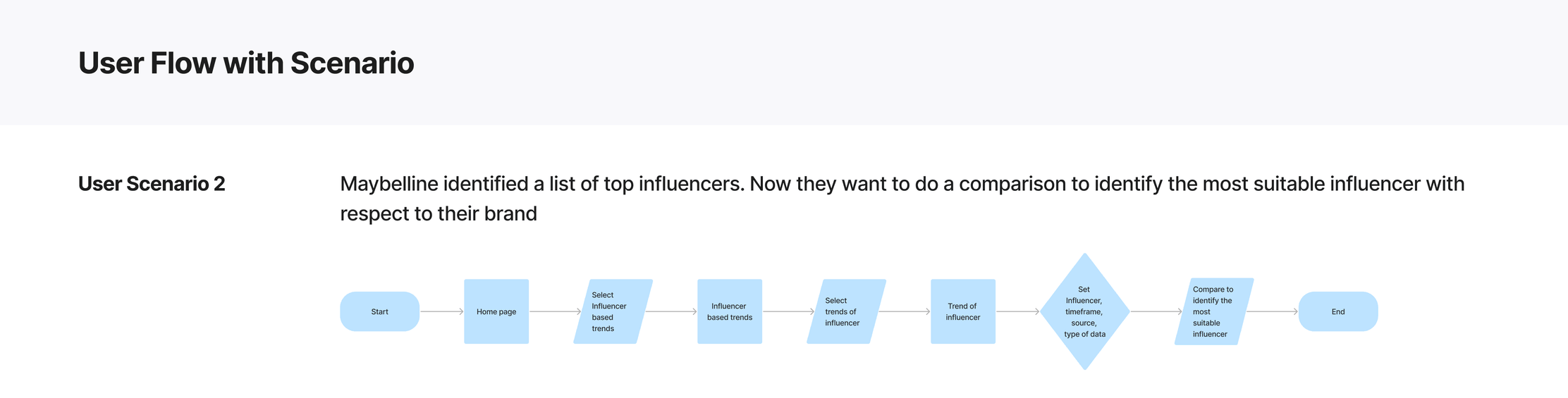
Compare influencers to pick the best fit
Maybelline has identified a list of top influencers. Now they want to compare them to identify the most suitable influencer for their brand.
Flow: Home page → influencer-based trends → select trends of an influencer → set influencer, timeframe, source and type of data → compare to identify the most suitable influencer.
User Scenarios 03 – 06
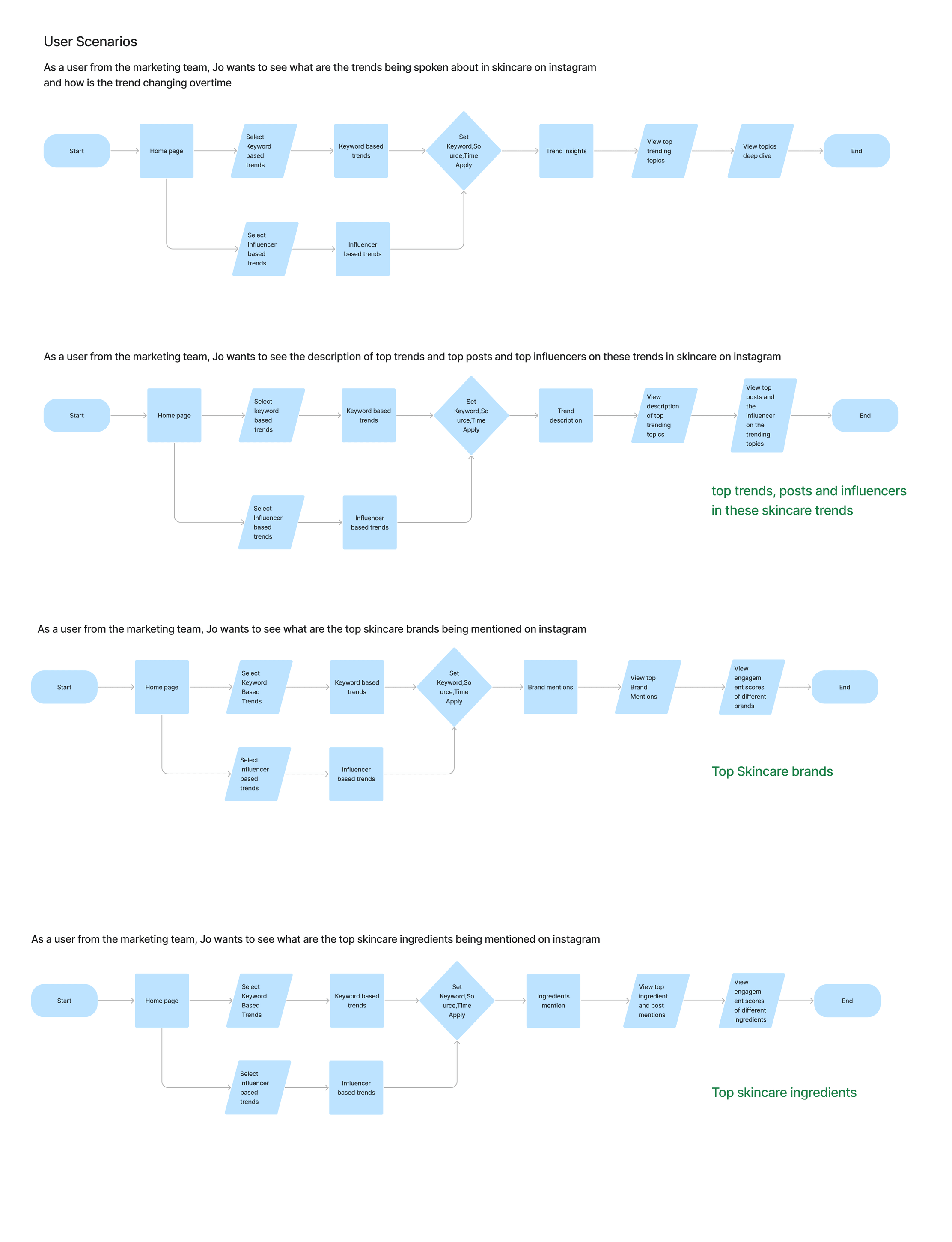
Jo, from the marketing team, exploring skincare on Instagram
- Trends over time: see what trends are being spoken about in skincare on Instagram and how they are changing over time.
- Top trends, posts and influencers: see the description of top trends, plus the top posts and top influencers on these trends.
- Top skincare brands: see which skincare brands are mentioned most on Instagram and how their engagement compares.
- Top skincare ingredients: see which skincare ingredients are mentioned most on Instagram and how their engagement compares.
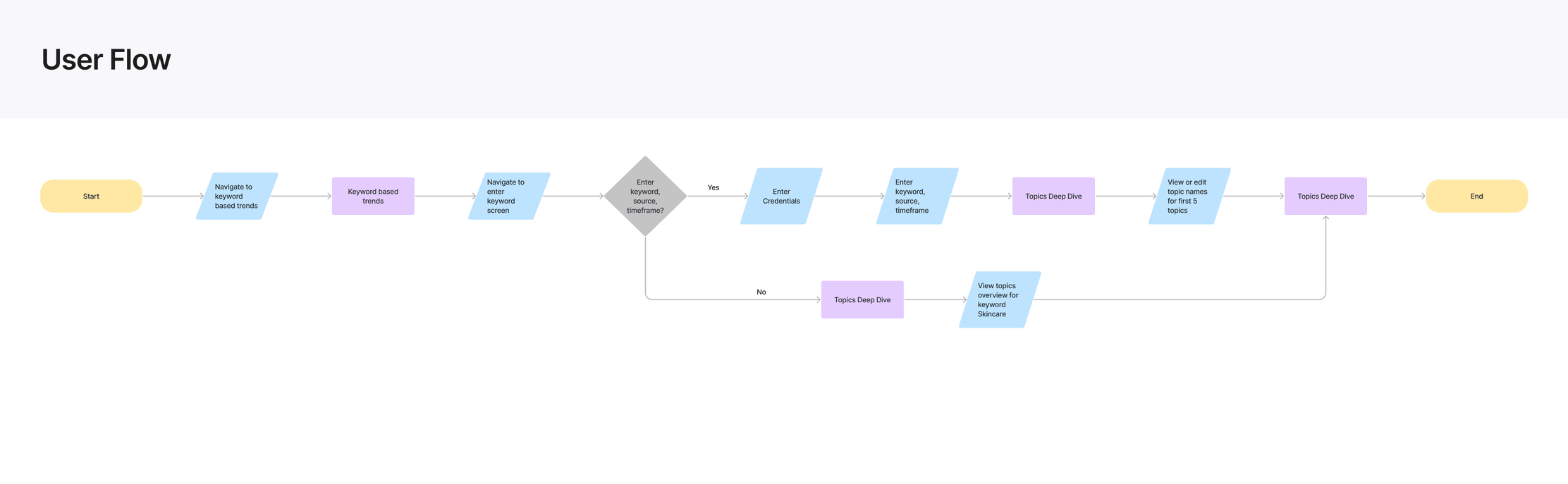
Task Flow & User Flow
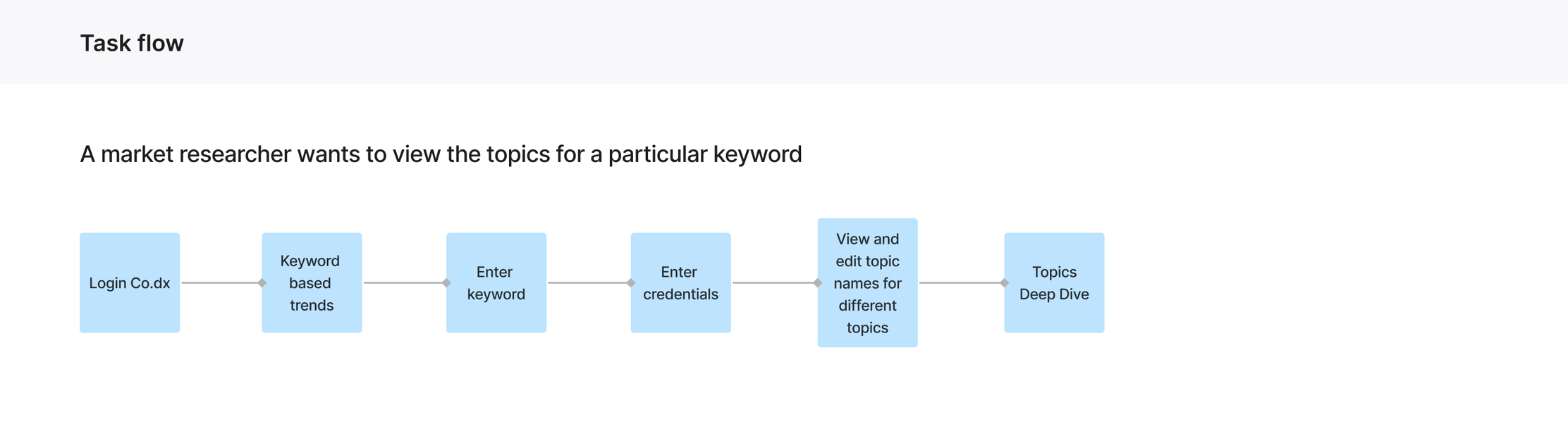
A market researcher views the topics for a keyword
The task flow maps the shortest path: log in, open keyword-based trends, enter a keyword and credentials, view and edit topic names for different topics, then open the topics deep dive. The user flow adds the decision point: a user who enters a keyword, source and timeframe goes on to view or edit the names of the first five topics; a user who skips it lands on a topics overview for the default keyword, Skincare. Both paths end in the topics deep dive.
Information Architecture
Everything starts from one question: what is being said about a keyword? A single filter bar — keyword, time range (4 weeks, 12 weeks or 6 months) and source — sits at the top and applies to every screen, so users never lose their context when they move between views. The content is split into six tabs, each answering one job.
01
Overview
The big picture and what changed: mentions, mood, brand share and auto-surfaced discoveries.
02
Topics
Themes inside the conversation, how people feel about each one, and where it is discussed.
03
Brands
Your share of voice against competitors, platform by platform.
04
Creators
Find and compare the voices that matter, including small creators with high relevance.
05
Campaigns
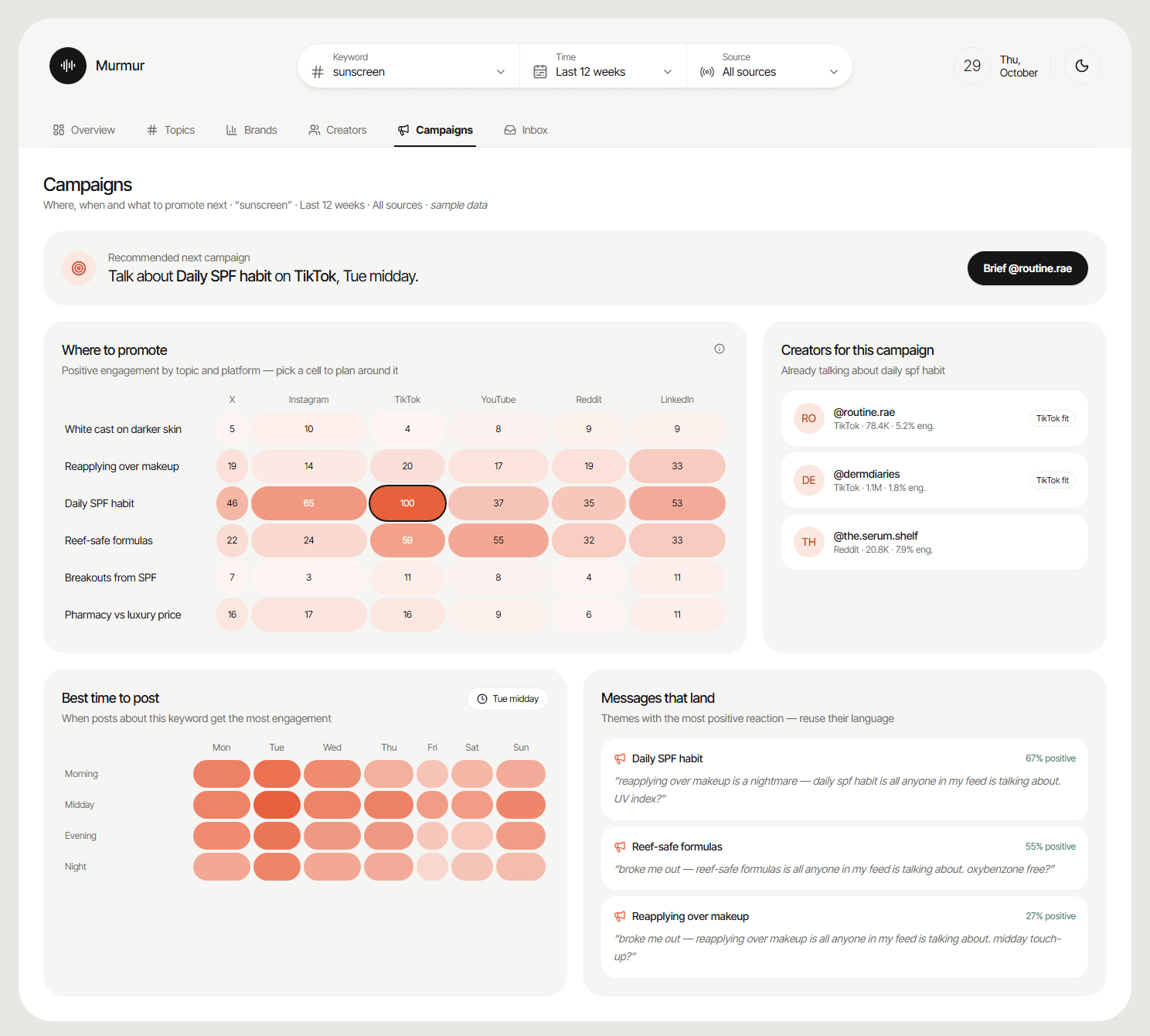
Where, when and what to promote next, with creators who already fit the topic.
06
Inbox
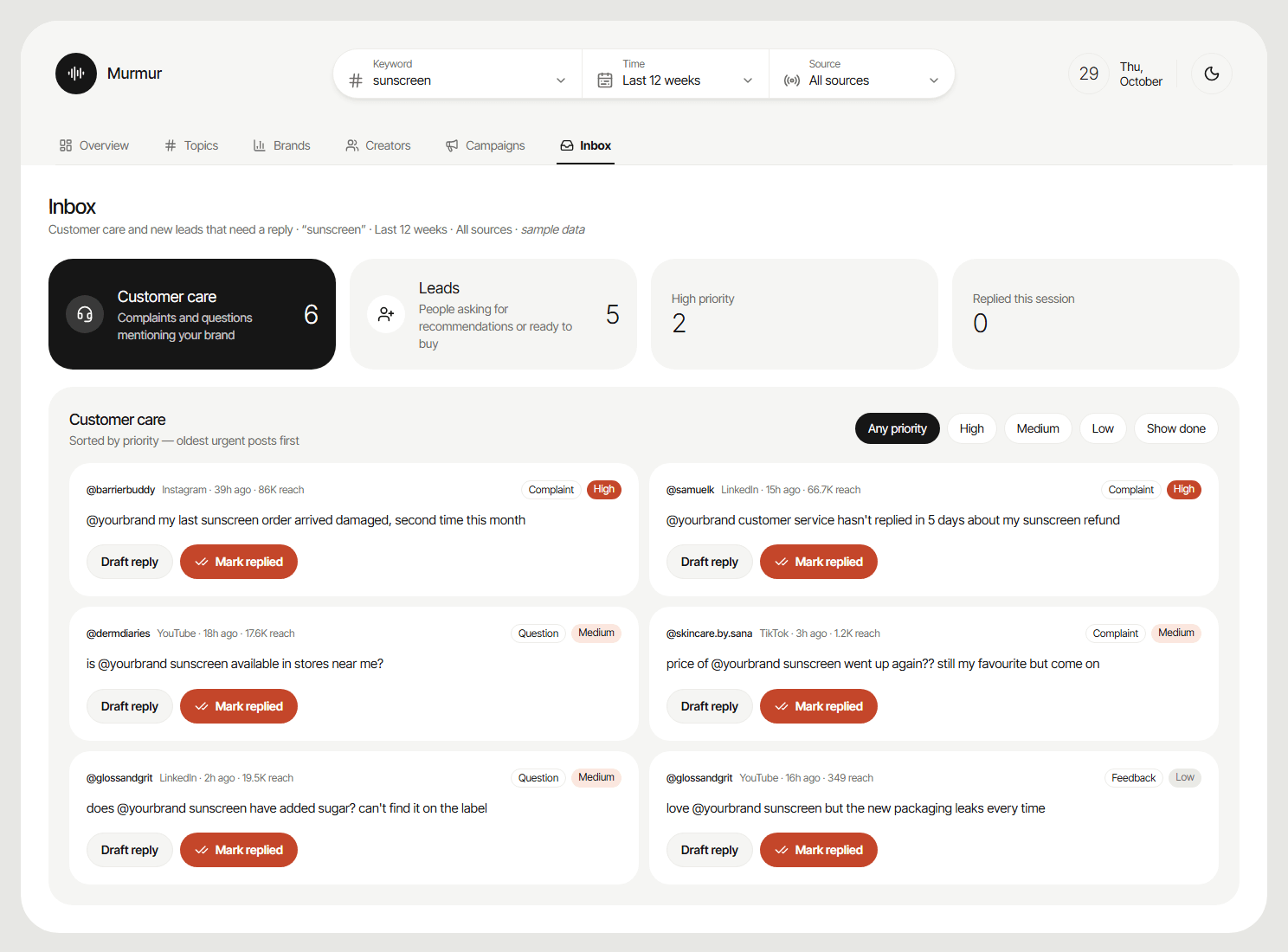
Customer care and new leads that need a reply, sorted by priority.
The Solution
Overview
The big picture, and what changed
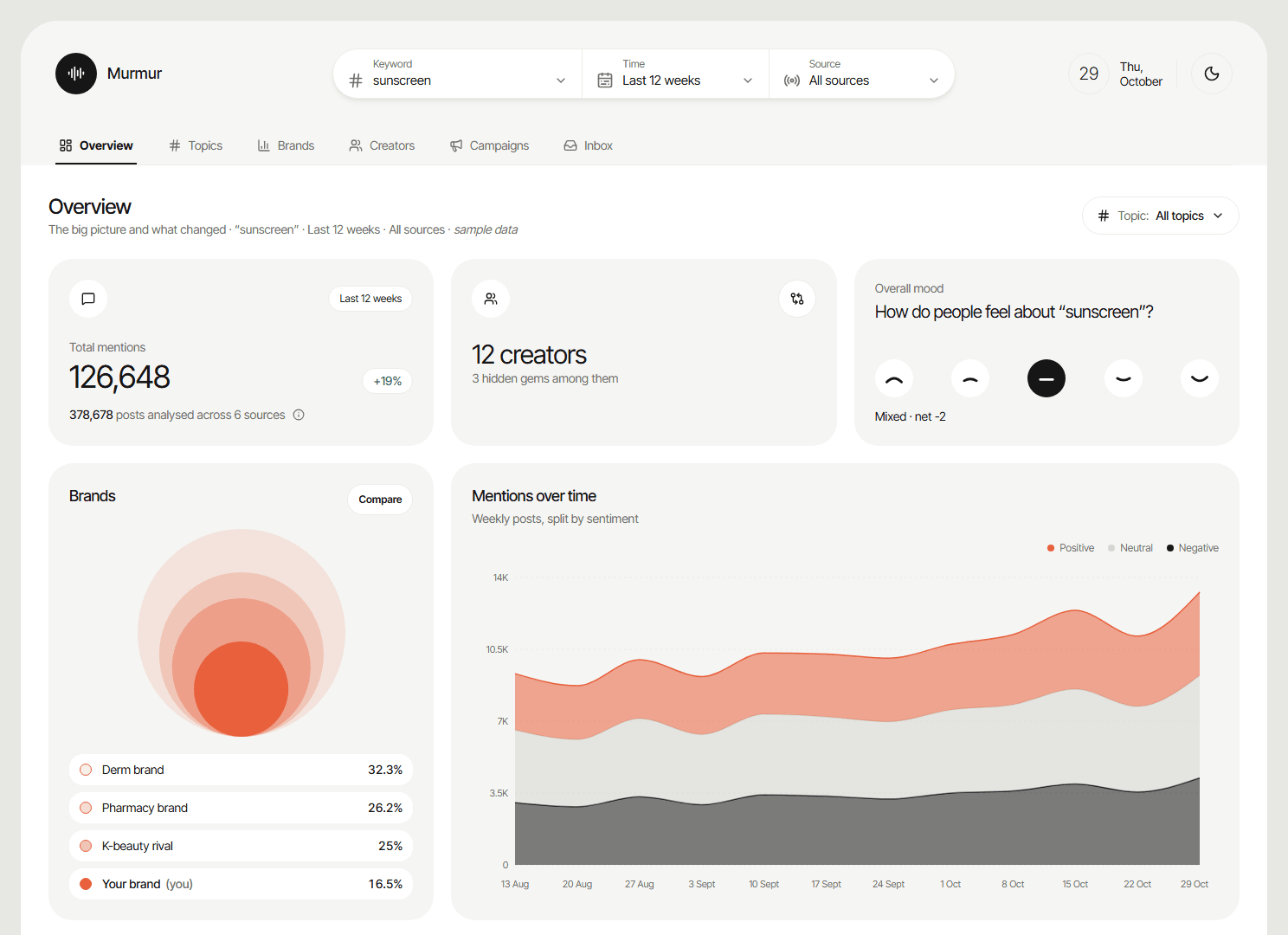
The landing screen answers "how are we doing?" in seconds. Total mentions with the change on the previous period, the number of creators in the conversation, and an overall mood scale sit at the top. Below, brand share of voice, mentions over time split by sentiment, top posts filtered by tone and trending topics give the detail. Discoveries are surfaced automatically — the fastest-growing topic, negative talk to watch, hidden-gem creators and competitors gaining share — each with a link straight to the screen that explains it.
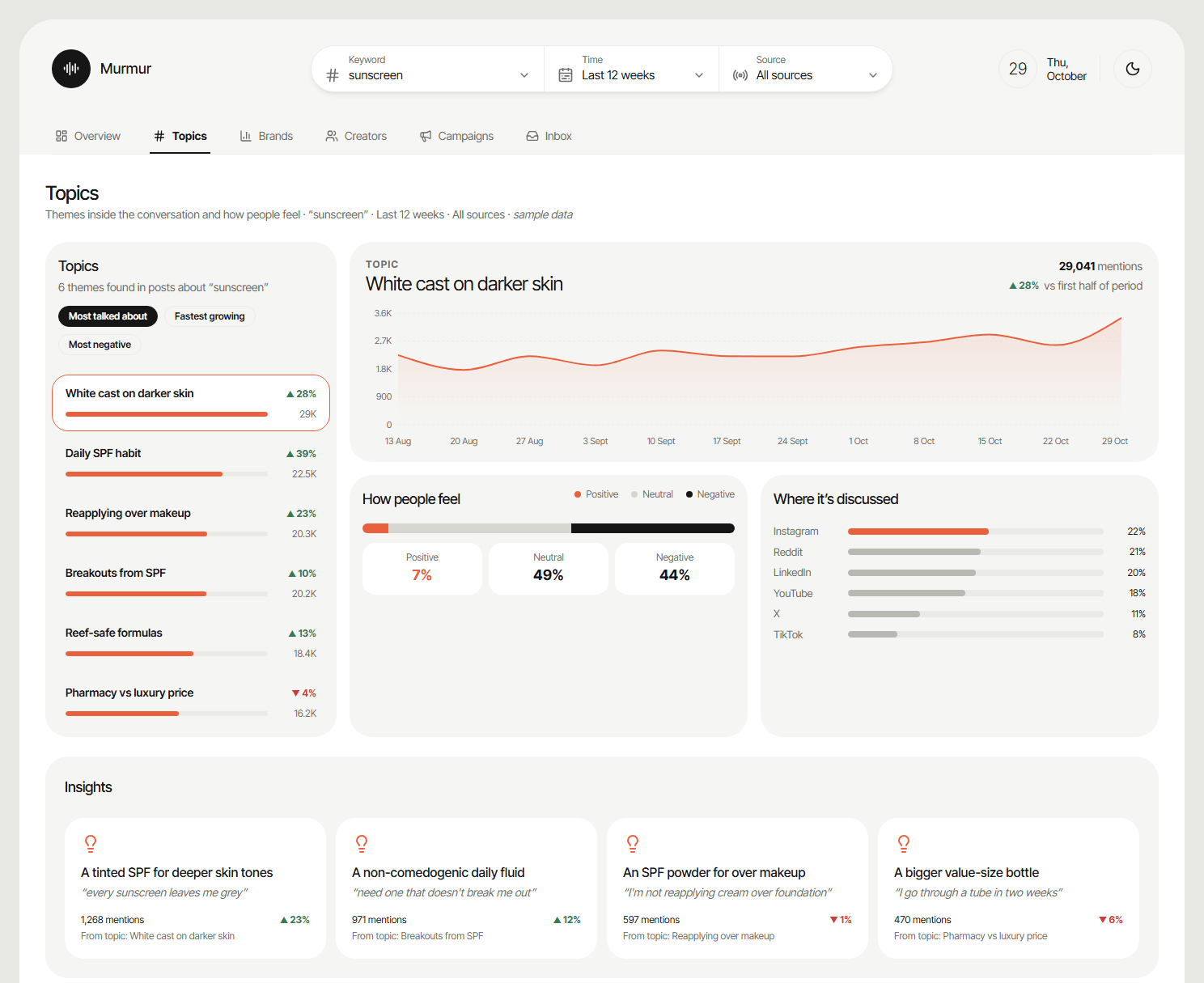
Topics
Themes inside the conversation
Posts are grouped into themes that can be sorted by most talked about, fastest growing or most negative. Selecting a topic shows its trend, how people feel, which platforms it lives on, example posts and the creators driving it. Insights turn complaints into product ideas — "every sunscreen leaves me grey" becomes "a tinted SPF for deeper skin tones" — with the number of mentions and growth behind each one, giving product teams evidence for innovation.
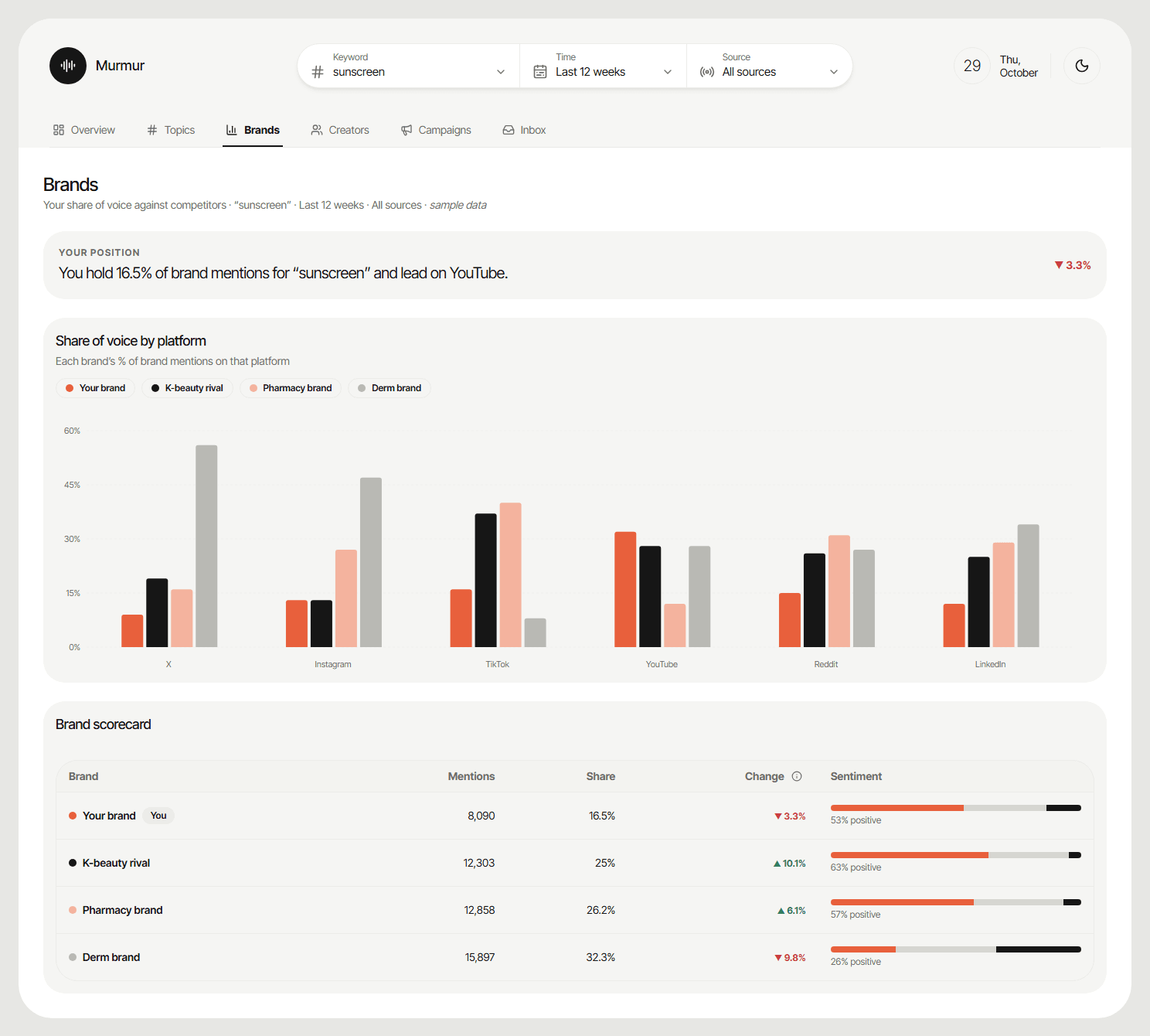
Brands
Benchmark against competitors
A one-line summary states the brand's position in plain language — its share of brand mentions and the platform where it leads. Share of voice is broken down by platform, so it is clear where competitors are winning, and a scorecard compares mentions, share, change and sentiment for every brand side by side.
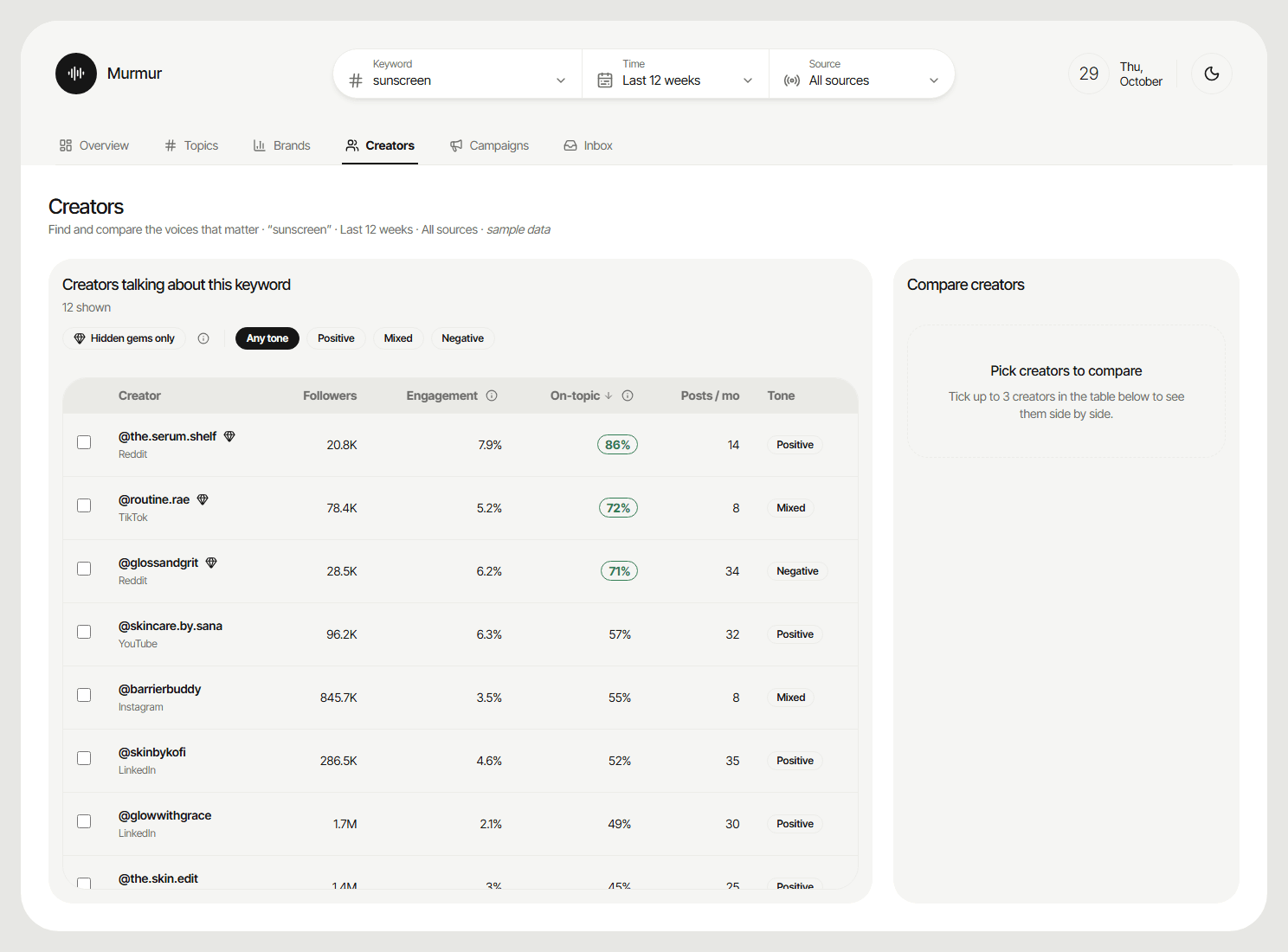
Creators
The right voices, not just the loudest
Creators are ranked by how much of what they post is on-topic, alongside followers, engagement, posting frequency and tone. A "hidden gems" filter surfaces smaller accounts with high relevance and strong engagement — often a better fit for a product launch than a large, general audience. Up to three creators can be compared side by side before a brief goes out.
Campaigns
Where, when and what to promote next
Listening turns into a plan. A recommended next campaign names the topic, platform, day and time in one sentence, with a button to brief the best-fitting creator. A heatmap shows positive engagement by topic and platform, another shows the best time to post by day and daypart, and "messages that land" reuses the language of the most positive posts — supporting targeted strategies and better budget allocation.
Inbox
Customer care and new leads
Posts that need a reply are collected in one place and split into two queues: customer care (complaints, questions and feedback that mention the brand) and leads (people asking for recommendations, comparing brands or ready to buy). Each post is prioritised by urgency, age and reach, so the oldest urgent posts come first, and comes with a suggested reply that can be drafted and marked as done.
Scenarios in the Product
How each scenario plays out in the dashboard. The filter bar (keyword, time and source) replaces the separate keyword and influencer entry points of the early flows, so every scenario starts from the same place.
Design Decisions
One filter bar for every screen
Keyword, time and source sit above the tabs because they apply to all of them. Switching screens never resets what the user is looking at.
Insights that lead somewhere
Every discovery ends in an action — explore topic, read posts, compare creator, compare brands — that opens the screen with the right item already selected.
Plain-language summaries
Key screens open with a sentence, not a chart: "You hold 16.5% of brand mentions and lead on YouTube." Charts then back the sentence up.
A calm, focused visual system
Off-white tonal layers, ink-black selection and a single coral highlight, set in Inter Tight with pill shapes. Colour is reserved for data and the one thing that needs attention.
Themes separate from components
Built on the NucliOS design system. The Murmur look is a theme layered on top, so colours can change without touching a single component, and the product supports dark mode.
Shareable, accessible views
The open tab lives in the URL, so a refresh or a shared link reopens the same screen. A skip link, labelled controls and a fully responsive layout keep it usable for everyone.