Collaborator
A centralized workspace unifying discussions and decisions for faster, transparent, cross-functional workflows
Overview
The user research revealed that decision-making is inherently collaborative, involving multiple touchpoints across teams, functions, and stakeholders. However, critical information, artifacts, and context are currently fragmented across different platforms, making discovery, validation, and comparison workflows time-consuming and difficult to navigate.
To address this, the collaborative experience was envisioned as a centralized workspace that brings together data, discussions, and decision artifacts into a single, connected ecosystem. By reducing fragmentation and simplifying cross-functional collaboration, the platform enables decisions to become more transparent, traceable, and actionable — ultimately accelerating the journey from insight to implementation.
Role
Lead Product Designer | NucliOS
User Research, Interaction, Visual Design, UX Design, Prototyping, Testing
July 2024 - October 2024
Competitor Analysis Insights
Click here to view more

Sender View
Initial stage of solutioning
Introduction of Threads
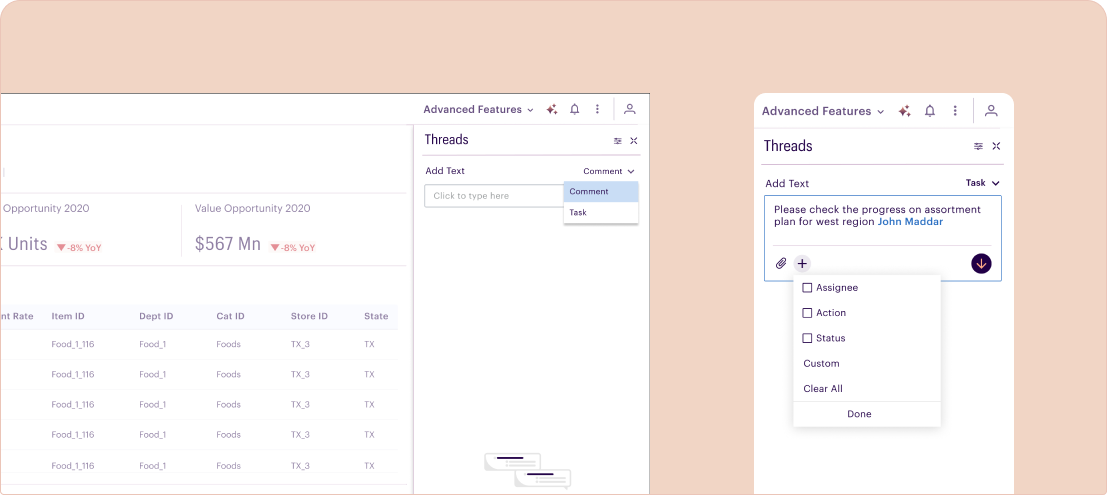
- Separation of thread types between read-only Comments and, other was action oriented called Tasks for ease in filtration
- The idea here is to trigger intent and focus while interacting with Collaborator feature
Drawer Placement
- During secondary research, a common pattern observed across platforms was the placement of communication and collaboration interfaces on the right pane of the screen. For NucliOS, this made the right-side drawer a natural choice for collaborative interactions.
- The decision was also influenced by common dashboard reading patterns such as ‘Z’ and ‘F’. Positioning collaboration features on the right helped users stay focused on the primary workspace while accessing contextual discussions and actions without disrupting their workflow.
Task types
- Within Task thread another layer having option to choose action type was added to this.
- This would empower NucliOS with enhanced power of collaboration
Sender View
Final version
Tag people
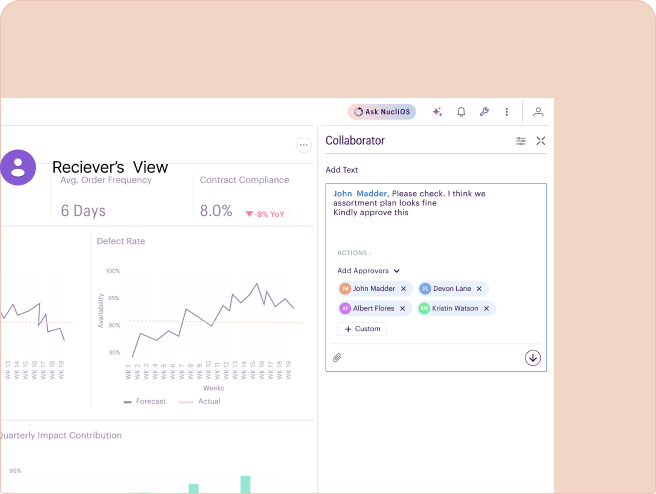
- The final solution evolved into a more minimal and streamlined version of the initial direction. Instead of using the term ‘Threads’, the feature was renamed to the more contextual and user-friendly term ‘Collaborator’.
- The experience was simplified to a single input field with the ability to tag users, add approvers, and attach files. An additional custom action button was introduced to later support scalable, workflow-specific actions tailored to different user needs and business contexts.

Receiver’s View
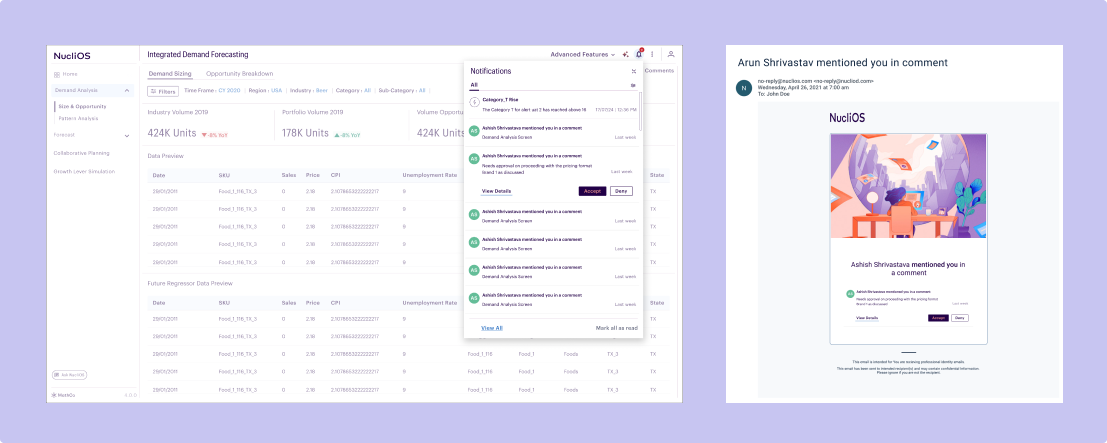
Notification
- Receiver will be notified as he/she logs in the platform. Parallelly a notification on email will also be sent out. User can directly perform action on these two screens or can also deep dive to review the comment and the thread on the Collaborator panel on the platform.
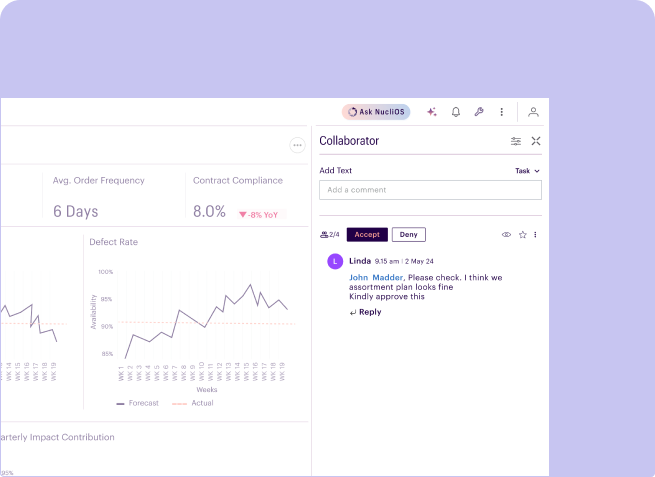
Approver
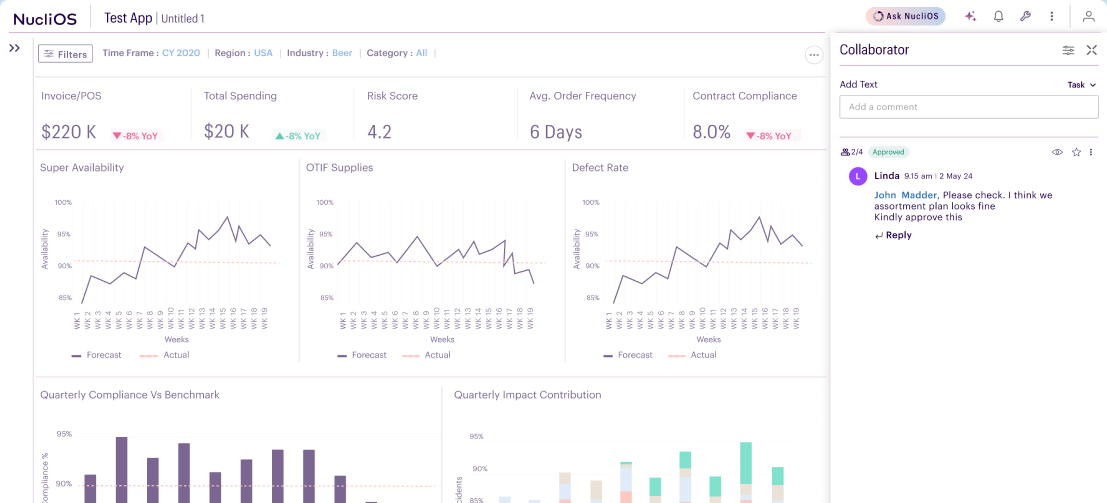
- Whenever an approver is added to a comment, the recipient receives this view along with visibility into the total number of approvers involved in the conversation and the latest updates or responses within the thread.
Other actions
- The eye icon on the top-left allows users to restore the exact visualization and data state from the moment the comment was created. When clicked, the filters, selections, and simulated scenarios on the left side of the screen automatically update according to the associated timestamp.
- This feature is especially valuable during feedback and approval workflows, as it provides stakeholders with precise contextual visibility, reducing back-and-forth communication and accelerating decision-making and approvals.
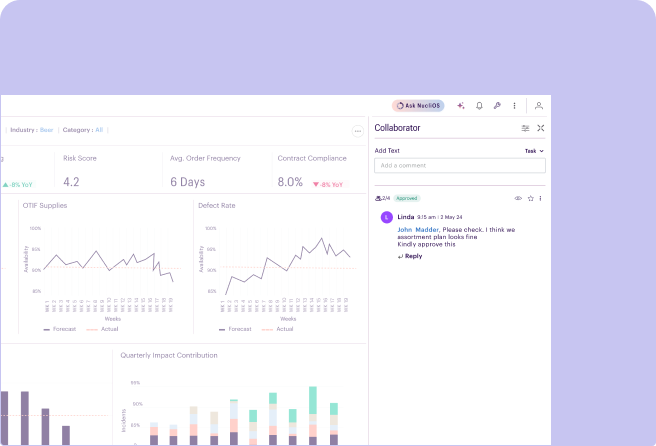
Status View
- The status view is common for both sender and the recipient
Future scope
The collaboration feature can evolve into a centralized decision-management system that streamlines approvals, discussions, and actions while improving transparency, accountability, and decision-making efficiency across workflows
- Ability to resend approval requests and reminders
- Approval status tracking for pending, approved, rejected or failed scenarios
- Contextual custom actions such as task assignment, escalation, simulations, or workflow triggers
- Integration with external platforms like Jira, Slack, Teams, and email systems
- Ability to forward threads to additional stakeholders
- Reopen closed discussions when further review is required
- Maintain version history and decision trails for accountability
- Automated summaries of discussions, approvals, and key decisions
- Centralized visibility of conversations, actions, and outcomes across workflows